
Overview
Integrating artificial intelligence into customer service is changing the way businesses handle inbound calls and routine processes. In this post, we’ll explore how you can build a highly functional AI voice receptionist using Vapi for the front end and a Naden MCP server running custom workflows on the back end. Whether you’re running a service business or automating admin for your team, this comprehensive walkthrough will show you exactly how to replicate (or customize) the system outlined in the video transcript.
What Is an AI Voice Receptionist?
An AI voice receptionist is an intelligent voice agent that interacts with callers, manages appointments, looks up client information, and routes queriesall via natural, human-like conversations. By connecting a conversational front end like Vapi (using OpenAI’s GPT-4.1) to robust backend automations (such as those powered by Naden workflows), you can automate complex workflows and deliver a seamless experience for customers and prospects alike.
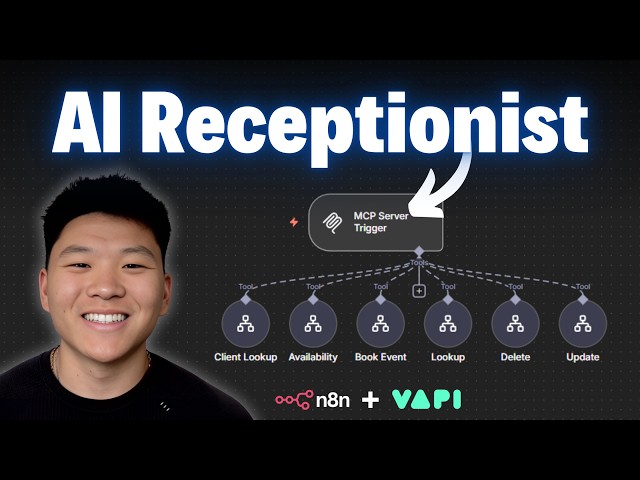
Architecture Overview: How the AI Receptionist Works
The system architecture comprises two main components:
- Vapi (Front End): This is the AI voice assistant that receives incoming calls. It handles the initial conversation flow, collects information, and determines caller intent.
- Naden MCP Server (Back End): This server runs multiple custom workflows for client management, appointment handling, logging calls, and more. Vapi communicates with this server through API calls to perform actions in real-time.
The magic lies in the seamless interaction between these two layers: Vapi listens and responds conversationally, while the MCP server executes structured, no-code backend workflows.
Step-by-Step: Building the AI Receptionist
1. Designing the Conversation Flow
Begin by mapping out your receptionist’s potential scenarios with a wireframe or flowchart. Identify key branches such as:
- Is the caller an existing client or new?
- Does the call relate to booking, changing, or deleting an appointment?
- Should the call be transferred to sales or support?
- Is the inquiry about general information?
Clearly documenting these conditions and possible responses helps when programming your system prompt and backend logic.
2. Configuring Vapi as the AI Receptionist
On the Vapi platform, create a new assistantgive it a persona, greeting, and clear instructions. For example, greet callers warmly, ask for their email, then check for their existence in the CRM.
Set up your system prompt meticulously. Include:
- Guidelines for requesting and confirming information
- Instructions on how to handle various intents (booking, changes, handoffs, FAQs, etc.)
- Steps for integrating with backend tools (“use the Naden tool to check the CRM” etc.)
Iterate the prompt based on testingVapi allows easy prompt adjustments, so refine as you observe user interactions.
3. Building Custom Workflows in Naden MCP
Your Naden MCP server acts as the system’s brain for data and automation. Typical workflows might include:
- Client Lookup: Checks if a caller exists in the CRM.
- New Client Creation: Gathers info and adds a contact if not in the system.
- Check Availability: Looks up open appointment slots.
- Book/Update/Delete Appointment: Modifies calendar events.
- Call Logging: Writes call summaries and outcomes for history and analysis.
Each workflow should be single-purpose to avoid logic overlaps and ensure quick, reliable responses. The server receives requests from Vapi, identifies the appropriate workflow through descriptive context, and executes tasks accordingly.
4. Connecting Vapi and Naden: API and Keys
To integrate Vapi with your Naden server, add the Naden MCP as a tool in Vapi, paste in your production server URL, and authenticate using a Naden API key (as an authorization header). Make sure your system prompt includes guidance for the assistant to call the MCP tool at the right moments, such as when looking up a client or checking availability.
5. Handling Transfers and FAQs
For scenarios like call transfers (to sales or support) and answering general business questions, utilize additional tools:
- Handoff Tool: Predefine destinations (other AI assistants or real phone numbers) for handoffs. The assistant can determine when a transfer is required and trigger the appropriate path.
- Knowledge Base Queries: Upload a policies and FAQ PDF directly into Vapi. Instruct your assistant to use only this file when answering general questions, ensuring accuracy and consistency.
6. Logging Calls and Automating Records
End-of-call reports and outcomes can be recorded in a CRM or Google Sheet via webhook automation. Specify what structured data to extract from calls (e.g., summary, outcome, email, appointment details) and send it to your log for monitoring or compliance purposes.
7. Assigning a Business Phone Number
With Vapi, you can assign a dedicated inbound number for your AI receptionist, allowing customers to call in as they would a regular front desk. Phone numbers can be managed entirely within the platform, linking to your specific AI assistant.
Best Practices and Considerations
- Transparency: Open conversations by clarifying that the caller is interacting with an AI assistant to set expectations.
- Specificity in Prompts: Use detailed system instructions and clear logic paths to reduce errors and ambiguity.
- Single-Function Workflows: Keep each backend workflow focused; avoid using multiple AI agents in one loop to minimize latency and cost.
- Security: Use secure API keys and handle sensitive data in compliance with applicable regulations.
- Testing and Iteration: Continuously monitor call logs and user interactions to improve the prompt, add FAQs, and refine automations.
Conclusion
Deploying an AI voice receptionist with tools like Vapi and Naden MCP streamlines customer engagement, reduces manual workload, and ensures information flows smoothly across your digital ecosystem. By structuring your workflows, crafting precise prompts, and integrating robust backend automations, you can design a system that not only answers calls but intelligently handles a vast range of business tasks. The future of business phone management is automated, accurate, and always available. Start prototyping your own AI assistant today and experience the operational benefits firsthand.
Note: This blog is written and based on a YouTube video. Orignal creator video below: